

|
4 min read
Increasing site performance in Umbraco Cloud
Increasing site performance in Umbraco Cloud

Do you have a bandwidth problem or a performance problem?
This is the question that ultimately saves you money.
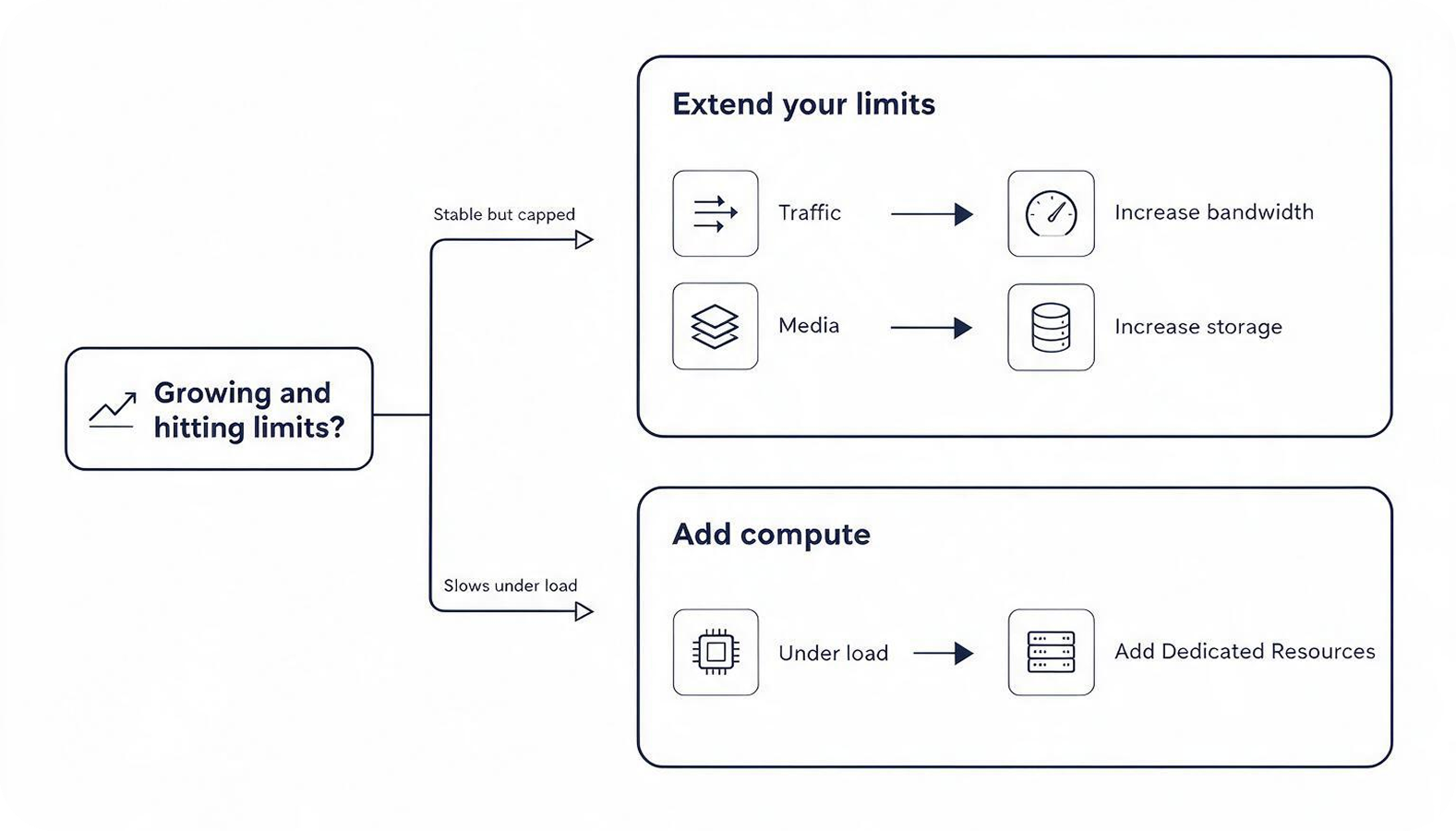
Many growing sites do not need more compute power at all. They need more bandwidth for visitor traffic, or more media storage for a growing library of images, video and documents. If your site is stable but bumping into transfer or storage limits, this is the cheapest fix, and Umbraco now lets us extend those limits without moving you to a bigger, more expensive plan.
If, on the other hand, your site slows down or times out under load even though bandwidth is fine, that is a compute problem, and it needs a different answer. Knowing which one you have before you spend anything is the first decision that matters.
How much performance does your site actually need?
When it genuinely is a compute problem, Dedicated Resources give your project its own CPU and memory instead of sharing, which is what delivers consistent, predictable performance when it is busy. Umbraco has refreshed these into four sizes, Extra Small through to Large, with more flexibility than before.
The part that matters for your budget is control. You add Dedicated Resources when you need them and scale back down, or return to shared hosting, once the peak passes, so you are not locked into paying year-round for capacity you only need a few weekends a year. Umbraco publishes the pricing for each tier openly, starting at $250aud for Extra Small (4 GB memory, 1 CPU core) and rising through to Large, so you can see exactly what a size costs before you commit.
When do you actually need load balancing?
Load balancing is where a lot of vendors try to upsell you early. Our position is simpler: you need it when a single instance, however powerful, is no longer enough, or when the site simply cannot go down.
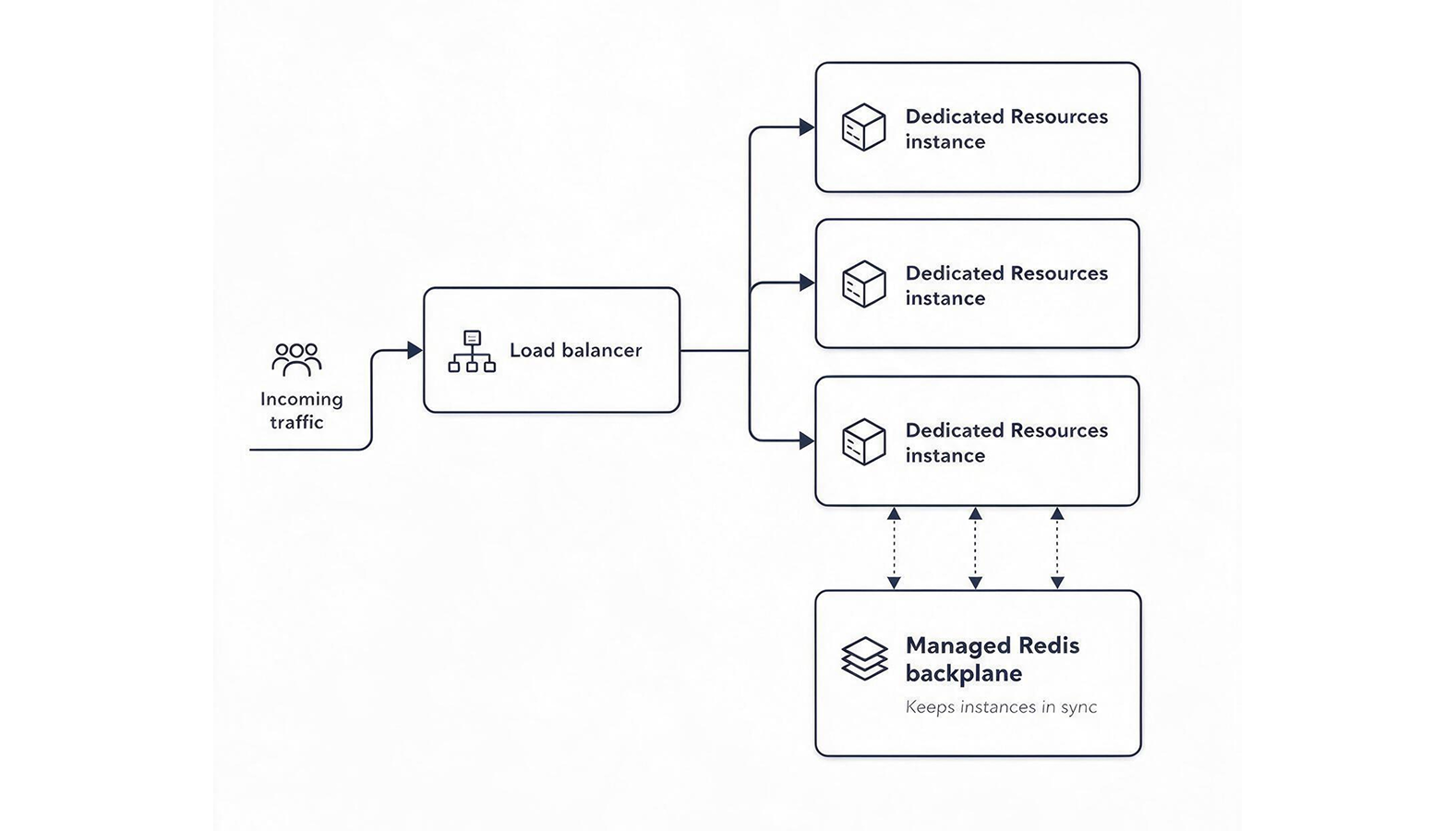
Concretely, it is the right call for business-critical sites, ecommerce, and high-traffic platforms that cannot absorb a single instance failing. It runs your application across multiple instances so it can handle higher throughput, smooth out traffic spikes, and stay up even if one instance falls over. On Umbraco Cloud it runs on dedicated infrastructure from the Professional Dedicated tier up, so Dedicated Resources are a prerequisite rather than an optional extra: load balancing is built on top of them, with a Managed Redis backplane keeping the instances in sync. If you are not in that category yet, you probably do not need it yet, and we will tell you so.
What does it cost to stay online during a spike?
There is no separate load balancing fee. You pay for the infrastructure it uses, the Dedicated Resources and the Managed Redis, and you can add both for a busy period and scale them back down afterwards. That makes a short campaign cheap to protect, because you size up for the peak and reduce again once it passes.
Weigh that against the downside of being dark during your busiest hour. For most organisations, the cost of scaling for a peak is a rounding error next to the cost of missing one.
Which option fits your situation
A quick reference to help you narrow it down:
- CDN caching: reduce repeat requests before adding resources.
- Bandwidth extension: allow for more traffic during busy periods.
- Media storage extension: add room for a growing media library.
- Dedicated Resources: add processing power when the site slows under load.
- Managed Redis: improve caching and support multiple instances.
- Load balancing: spread traffic across instances and reduce the risk of downtime.
Planning for your next traffic spike
Start by checking where the site is reaching its limit. Bandwidth and storage extensions cover capacity issues. Dedicated Resources provide more processing power. Load balancing is for sustained traffic across multiple instances or sites where downtime is unacceptable.
For a campaign or launch, review recent traffic, expected demand and the parts of the site that cannot be cached. This gives you enough information to choose the appropriate option and estimate how long it needs to run.
Planning for a traffic spike? Send us a message and we can help you work out what your site needs.